Who is worth a roster spot?
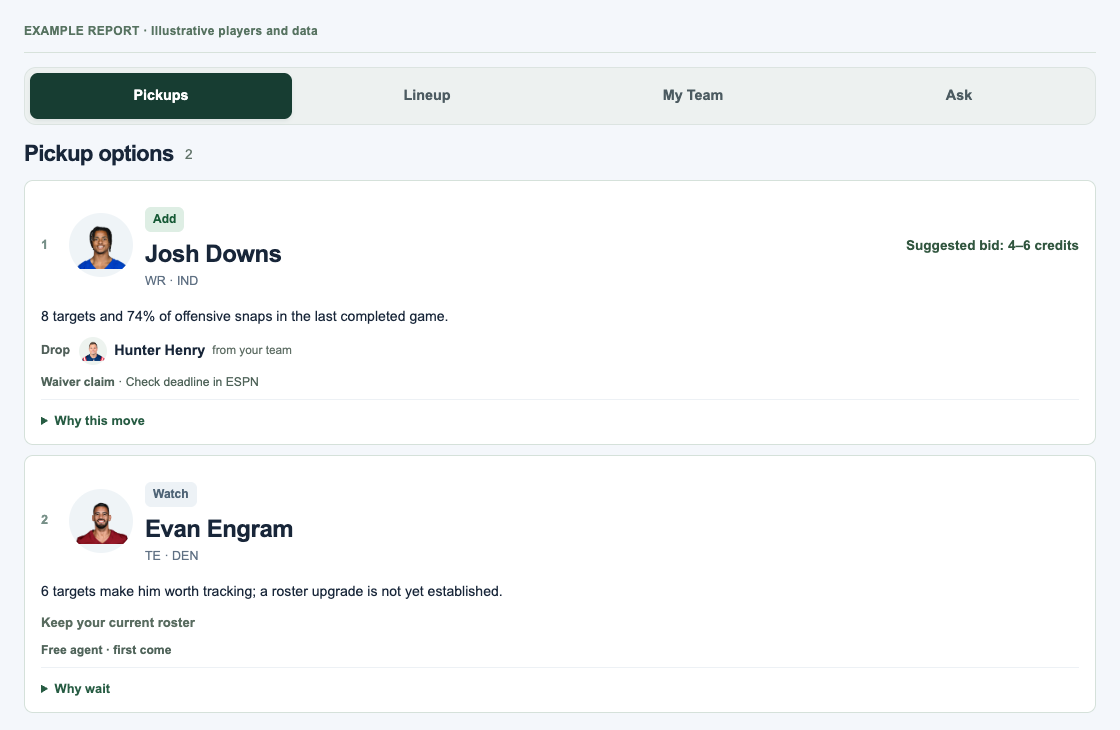
Up to five available players, ranked for your team. See the main reason first, then expand for evidence, a suggested drop and bid when supported, or a clear reason to hold.
How it works · The current pilot
A focused pickup list, lineup checks, and the case for who to keep or drop—built around your ESPN league.
Inside the app
Start with the pickup, bid and one clear reason. The recommended drop stays alongside it.
Getting started
Sign in with an approved pilot account and paste your ESPN team link. Private leagues need two session values; our screenshot guide walks you through it.
The engine reads your current roster and available players, selects the league week automatically, and checks roster fit, completed-game workload and lineup concerns.
Compare the pickup with what you’d give up. Make your choice in ESPN, then refresh the report to reflect your changed roster.
Inside your dashboard
Up to five available players, ranked for your team. See the main reason first, then expand for evidence, a suggested drop and bid when supported, or a clear reason to hold.
Review injured starters, eligible bench alternatives, weekly projections, and role or team-injury concerns. Kickoff deadlines help you act before players lock.
Your starters, bench, waiver budget and matchup in one place. ESPN projections give way to points scored as games progress, with final scores when available.
Ask follow-up questions about your saved report. Open the supporting evidence, coverage notes and recent reporting when you want more detail.
Urgent lineup alerts stay visible across tabs.
Behind the recommendations
The engine filters and scores the player pool using code and football data. A recommendation refresh includes a public-news check for the top pickup when available. Follow-up answers help explain the evidence.
Your scoring, positional needs, roster limits, availability and remaining waiver budget shape the recommendations. The shortlist currently focuses on quarterbacks, running backs, receivers and tight ends.
For a recommended pickup, the report leads with one selected drop, its keep/drop tradeoff, and what would change the call. Other players considered are tucked into a separate comparison. It considers depth-chart position, injury-stash upside, recent role and whether the pickup actually improves an eligible starting slot.
Where verified data is available, the engine looks at carries, targets, snap and target shares, and expected points from the quality of rushing and receiving opportunities. That can surface useful workload before it turns into a big fantasy score.
Expected points measure the quality of a player’s past opportunities. Coverage notes show which games and players have data.
ESPN projections for your league are the baseline. The engine compares eligible, unlocked starter and bench options, then adds available workload, opponent and dated injury context—including relevant quarterback and offensive-line injuries.
Team injuries add context to the ESPN projection. Position-specific defensive matchup grades are not available yet.
Choose “Refresh recommendations” to update your ESPN report and check public news about your top pickup. No separate news checkbox is needed. Ceramic searches for reporting and Grok assesses qualifying evidence. Sources are checked for relevance, publication dates and supporting text; when evidence is insufficient, the app says so.
In Ask, Grok answers follow-ups using your saved report, with your permission. Follow-ups use that report rather than a fresh search.
Research is limited to a selected candidate and cached when possible. Browsing tabs or opening player details does not make an AI call.
Your private-league session is stored encrypted so you don’t have to reconnect each visit. ESPN may expire it. You can delete the saved connection in Settings.
ESPN cookies and account/contact details are excluded from AI requests. Public-player research uses public player information; team-specific questions require your permission to share the football context shown in the consent notice. Read the privacy details →
When to check
Recommendations refresh when you request a check; opening the dashboard shows your saved report. The dashboard displays its timestamp and next available refresh. Lineup advice older than 30 minutes requires a new check before it can offer current decisions.
Matchup scores update separately while the browser page is visible, generally every two minutes during live games. Final scores can receive stat corrections. News checks may reuse checked sources for up to six hours; its timestamp is shown separately.
Alerts in this pilot: warnings appear in the dashboard. Email, text and push alerts are not active yet.
Approved for the friends pilot? Connect ESPN and run your first check.